
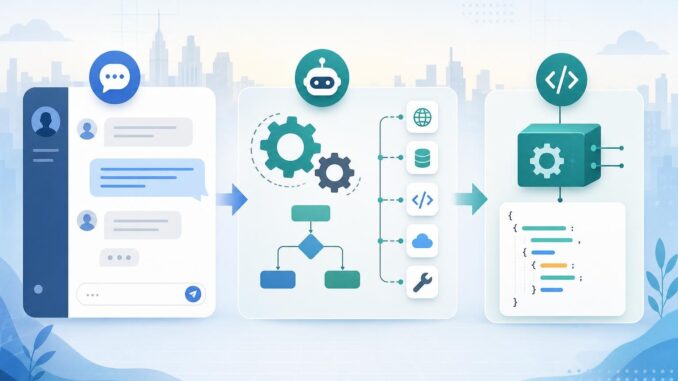
When you build an AI product, one early architectural choice is how users and systems should interact with the language model. Choosing the right pattern—synchronous chat, background/agentic workflows, or focused task APIs—shapes user experience, cost, latency, privacy, and developer workload.
Core interaction patterns at a glance
Below are concise descriptions and the most common use cases for the three patterns covered in this guide.
Synchronous chat (request–response)
Description: A direct, interactive exchange where the client sends text (or multimodal) input and receives an immediate model response. UX is conversational and stateful in-memory.
- Common uses: customer support chat, copilots, drafting editors, Q&A widgets.
- Strengths: simple mental model, low implementation complexity for basic flows, predictable UX for users who want instant answers.
- Weaknesses: can be expensive for long histories; not ideal for long-running background work or multi-step external actions.
Background agents (agentic or workflowed)
Description: A controller process runs multiple model calls, integrates external tools or APIs, manages state, and continues work independently of a single user request.
- Common uses: multi-step automations (e.g., multi-source data collection, scheduling, cross-system updates), monitoring tasks, continuous assistants.
- Strengths: handles long-running, conditional, or multi-system workflows; can retry, checkpoint, and orchestrate tools.
- Weaknesses: higher engineering complexity, harder to reason about failure modes, potentially greater surface for data exposure.
Task APIs (specialized, structured endpoints)
Description: Small, focused APIs that use an LLM to perform a single well-defined function and return structured outputs (JSON, entities, classifications).
- Common uses: summarization endpoint, entity extraction, intent classification, code translation.
- Strengths: lower variance in outputs, easier validation, lower integration cost for front-end developers.
- Weaknesses: limited flexibility; adding new behavior often means creating new endpoints or prompt templates.
Decision framework: tradeoffs and signals
Use the questions and signals below to map your product requirements to the most appropriate pattern.
1. User expectations: interactivity versus automation
If users need conversational back-and-forth with immediate feedback, prefer synchronous chat. If they expect the system to act without constant involvement (e.g., prepare a report overnight), background agents fit better. If users want a predictable, structured output (like a JSON summary), choose a task API.
2. Latency and UX tolerance
- Low-latency interactive flows: synchronous chat or carefully tuned task APIs.
- Long-running or asynchronous processes: background agents with progress updates and webhooks.
3. Cost and model usage patterns
Chat can be cost-efficient for short, simple exchanges but gets expensive with long histories or repeated context fetching. Task APIs are easier to optimize and cache. Background agents often make many model calls across steps—budget accordingly and use cheaper models for intermediate reasoning where possible.
4. Privacy and data residency
If sensitive data must never leave a controlled environment, task APIs with strict sanitization and local preprocessing can reduce exposure. Background agents that call multiple external tools raise more surface area; lock down service accounts and minimize logging of raw PII.
5. Developer effort and operations
Synchronous chat is fastest to prototype. Task APIs need careful schema design and validators but are straightforward to operate. Background agents require workflow orchestration, durable state, retries, and observability.
6. Reliability and failure modes
Task APIs are easiest to validate and test with unit-style checks. Chat flows need guardrails to avoid drift. Background agents require explicit rollback, checkpointing, and compensating transactions for external side effects.
Architecture sketches and concrete examples
Example A — Customer support chat (synchronous)
Architecture sketch: web client → frontend state → auth layer → chat service → LLM API. Optional: short-term vector store for recent tickets.
Implementation tips:
- Keep a rolling context window; trim older messages server-side and summarize long histories.
- Use a trust boundary: sanitize user inputs before adding them to context to limit prompt injection.
- Monitor latency and display typing indicators; degrade gracefully by returning cached suggestions if the model is slow.
Example B — Retail restock agent (background)
Architecture sketch: trigger (schedule or event) → orchestrator service (workflow engine) → LLM calls + tool integrations (inventory API, email, database) → persistent state store → webhook or notification to the user.
Implementation tips:
- Checkpoint after each external action; store model decisions and inputs to make errors auditable.
- Separate planning (LLM) from execution (deterministic service calls). Only use the model to propose actions, which your code validates before executing.
- Design idempotent operations and retry policies for external failures.
Example C — Document extraction API (task API)
Architecture sketch: client uploads document → preprocessing (OCR, redaction) → task API endpoint (schema-driven LLM prompt) → postprocessing → structured JSON result.
Implementation tips:
- Define a strict JSON schema and validate outputs with a deterministic parser; reject or re-call the model if validation fails.
- Use simpler models for extraction and reserve stronger models for ambiguous examples to save cost.
Safe defaults, common failure modes, and monitoring
Safe defaults
- Default to task APIs for any structured output you must validate or store.
- Require user confirmation before background agents make irreversible external changes.
- Log prompts and model outputs in a secure, access-controlled store with retention policies.
Common failure modes and mitigations
- Hallucinations: validate outputs against known facts, external APIs, or deterministic heuristics before acting.
- Prompt injection: sanitize inputs and separate user-supplied content from system instructions.
- Cost spikes: set rate limits, model usage alerts, and per-request budget caps.
- Partial automation errors: design compensating transactions and manual rollback paths.
Monitoring and rollback controls
Track these signals: request latency, model token usage, output validation failure rate, external action success rate, and user escalation. For background agents, capture checkpoints and expose a human-in-the-loop abort endpoint. Implement feature flags and canary rollouts for new agent behaviors so you can disable or revert changes quickly.
Practical checklist to choose a pattern
| Decision question | Prefer chat | Prefer agent | Prefer task API |
|---|---|---|---|
| Need conversational, immediate UX? | Yes | No | No |
| Requires long-running or multi-step cross-system work? | No | Yes | Sometimes (if the step is isolated) |
| Need strong output validation and structured results? | No | Maybe | Yes |
| Limited engineering resources for orchestration? | Yes | No | Depends |
Use this checklist as a starting point. Often products combine patterns: a chat interface that triggers a background agent, or a task API used inside a conversational flow.
Conclusion
There’s no single correct pattern—each has clear tradeoffs. Start by mapping user expectations, latency tolerance, privacy needs, and developer capacity. Default to task APIs when outputs must be structured and validated, use synchronous chat for interactive experiences, and reserve background agents for orchestrated, multi-step workflows with robust checkpointing and human oversight. Combine patterns where appropriate, instrument aggressively, and prepare rollback controls before full launch.
FAQ
Q: Can I mix patterns in one product?
A: Yes. Many products use chat for the UI, task APIs for structured subroutines, and background agents to run scheduled or long-running automations. The key is clear boundaries and consistent monitoring.
Q: How do I control costs when using background agents?
A: Use cheaper models for internal planning steps, cache intermediate results, set per-agent budgets, and alert on cost anomalies. Design workflows to minimize unnecessary re-evaluation.
Q: What’s the best way to validate LLM outputs?
A: Combine schema validation, deterministic heuristics, external API verification, and fallback human review for high-risk actions. For question-answering, corroborate facts with trusted sources before finalizing results.
Q: How should I handle errors from an agent that performed external actions?
A: Implement compensating transactions where possible, keep an immutable action log for auditing, and provide a human rollback or remediation interface. Design agents to avoid making irreversible changes without explicit confirmation.