
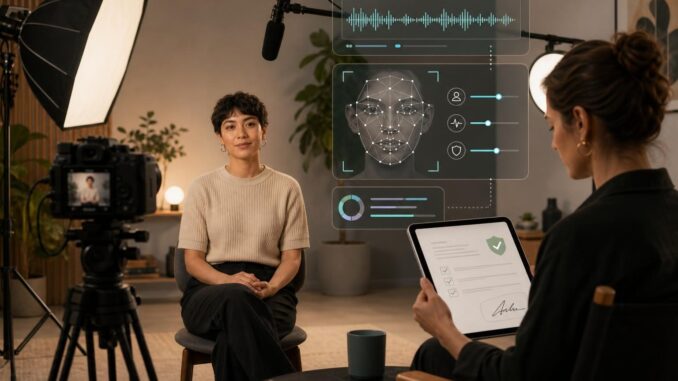
AI video tools that can place a real person front and center are powerful for creators, educators, and small businesses. They also raise real ethical, legal and privacy questions. This guide gives a clear, repeatable workflow to create short AI videos that feature a real person while protecting consent, managing data, and producing a clean final clip.
Step-by-step workflow: plan, capture, generate, edit
1. Plan: intent, scope, and consent
Before any recording, set these boundaries in writing:
- Purpose: promotional, archival, experimental, educational, or other.
- Scope: length (30–90 seconds recommended for initial tests), where it will be published, and whether derivatives are allowed.
- Data handling: who stores the raw files, how long they are kept, and whether biometric or model data will be uploaded to third-party services.
Actionable step: Draft a one-paragraph summary that states purpose, platforms, and retention. Share it with the person on camera and get explicit written consent before shooting.
2. Capture: reliable, privacy-minded reference material
Good source footage makes synthetic generation easier and safer. Capture more reference data than you think you need—but keep it controlled.
- Environment: neutral, well-lit background. Soft front lighting reduces facial shadows and helps models produce cleaner results.
- Camera: smartphone or mirrorless DSLR at 1080p or higher. Stabilize with a tripod.
- Audio: record clean audio with a lavalier or directional mic for easier lip-sync or voice-clone matching later.
- Takes: 2–4 neutral-expression headshots, a few smiling and emotive takes, and short scripted lines. Include a slow 15–30 second pan and a few 5–10 second closeups for profile and three-quarter angles.
- Wardrobe: avoid tight repeating patterns and reflective jewelry that confuse facial tracking.
Actionable checklist for capture: tripod, continuous light, lav mic, plain background, 2 neutral takes, 3 expressive takes, closeup pan.
3. Consent & release: what to collect and a sample template
Collect two documents: a consent summary (short) and a model release (detailed). Keep digital copies and record the version date.
Sample short consent (use as an email or printed summary):
Consent Summary
I, [Name], consent to be recorded for the project: [Project Name]. I understand the intended uses: [list platforms]. I agree that reference footage may be used to create AI-generated video featuring my likeness. I understand I can revoke consent within [X] days and that revocation may not remove derivatives already published.
Signature: ____________________ Date: __________
Sample model release (concise template):
Model Release
I, [Name], grant [Producer/Company] permission to use my name, image, voice, and likeness in AI-generated and edited video content. Uses include: distribution, promotion, and archival. I understand the scope, data retention policy, and who will have access to raw and generated files. I hereby release [Producer/Company] from liability related to the use of this content within the agreed scope.
Signature: ____________________ Date: __________
Actionable step: Have the subject sign both documents before recording. Store signed copies in a secure folder and note the contact method for revocation requests.
4. Generate: safe tool choices and prompt examples
Tool selection matters. Decide whether to use a local model or a cloud service that processes and stores biometric data. Prefer tools that explicitly document data deletion and model-use policies.
Generation workflow:
- Test with a short clip (10–20s) to confirm lighting and voice match.
- Upload minimal necessary reference clips—prefer trimmed, high-quality shots rather than raw long takes.
- Use the tool’s privacy settings: disable sharing, opt out of training if available, and request data deletion after the job completes.
- Check for artifacts and emotional fidelity; iterate with new reference frames as needed.
Prompt examples for a neutral, professional AI-generated clip (adapt to tool syntax):
Prompt (concise): Create a 45-second first-person message. Tone: warm, professional. Pacing: moderate. Match lip-sync to provided audio. Keep gestures minimal. Background: subtle office blur.
Prompt (marketing): Produce a 30-second promotional clip introducing [Product]. Energetic tone, smile, mention the three benefit points: [A], [B], [C]. Keep to 30 seconds.
Actionable step: Always pair a generation prompt with the exact reference clip names and a short checklist of what not to change (e.g., identity, age, distinguishing marks) to prevent unexpected edits.
5. Post-production: edit, review, and approval
After generation, run a human review before publishing:
- Verify likeness: confirm the person can recognize themselves and approve the final clip.
- Check audio sync, background continuity, and any unintended edits.
- Document changes: keep a short changelog describing edits and tool settings used.
Actionable step: Get a final signed approval that repeats the original scope and confirms satisfaction with the delivered clip.
Practical examples and templates
Example scenarios
Example 1 — Creator update video: Record a 60-second update, consent to promotional use on social platforms, keep raw files for 90 days, and allow deletion on request. Use a short model release and a single-generation test clip before batch producing episodes.
Example 2 — Small business product demo: Have an employee sign a release allowing use for ads and website demos. Capture multiple angles and a clean audio track, run two test generations (voice-only and full video), and get legal review if the business intends to use the likeness in paid advertising.
Sample prompt snippets for style
Casual educator: "Explain the feature in plain language, friendly tone, 60 seconds max. Use gestures and occasional head nods. Smile at the start and end."
Formal spokesperson: "Deliver script verbatim, steady pace, neutral expression, 30 seconds. Minimal hand movement."
Limitations, risks, and how to mitigate them
- Misuse: AI-generated likenesses can be repurposed. Mitigation: limit distribution, watermark repository files, and require contractual restrictions on redistribution.
- Technical artifacts: lip-sync mismatches or unnatural micro-expressions. Mitigation: iterate with better lighting and closeups; use post-editing to smooth sync.
- Privacy and storage: third-party services may retain biometric inputs. Mitigation: prefer services with clear deletion policies or run models locally where feasible.
- Revocation limits: once published widely, revocation cannot erase all copies. Mitigation: agree on an initial trial period for public release and preserve the right to retract future licensing.
Simple production checklist
- Written consent summary and signed model release stored securely.
- Plan documented: length, platforms, retention, distribution limits.
- Capture kit: tripod, lav mic, soft front lighting, neutral background.
- Reference set: 2 neutral takes, 3 expressive takes, 1 slow pan, audio reference.
- Test generation: 10–20s clip verified before full production.
- Privacy settings checked on generation tools; deletion requested if supported.
- Final signed approval from the person featured before publishing.
Conclusion
Creating AI videos that include a real person is achievable and valuable when you pair a clear workflow with strong consent and data practices. Plan the scope, capture good reference material, use privacy-aware tools, collect signed releases, and always run a human review before publishing. These steps reduce legal and ethical risk while keeping the creative process efficient.
FAQ
Can someone revoke consent after an AI video is produced?
Yes—someone can request revocation, but practically, revoking public content may be limited. The release should specify how revocation works and any time limits. If you use third-party tools, document whether data deletion is available and act quickly if revocation is requested.
Should I avoid cloud services for sensitive likenesses?
Consider the sensitivity and the provider’s data policy. Cloud services are convenient but may retain biometric data. For sensitive projects, prefer local processing or providers that offer clear data deletion and do-not-train options.
How much reference footage do I need?
Start with several short, high-quality clips: 2 neutral headshots, 3 expressive takes, and one slow pan. More varied angles help, but avoid uploading unnecessary personal footage—only what the model release covers.
What’s the quickest way to check for artifacts before publishing?
Generate a short 10–20 second proof clip, watch it at full resolution, and have the person featured confirm identity and comfort. Verify lip-sync, eye movement, and occlusions like glasses or jewelry that may cause glitches.